Retani Studio: Moodle Page Builder
Building Moodle Pages Without Code: Why Drag and Drop Matters
- Client
- Retani Consults ↗
- Platform
- Moodle 5.3
- Stack
- PHP · Moodle · Mustache · JavaScript · SCSS
- Delivered
- Nov 2026
- Link
- View project ↗
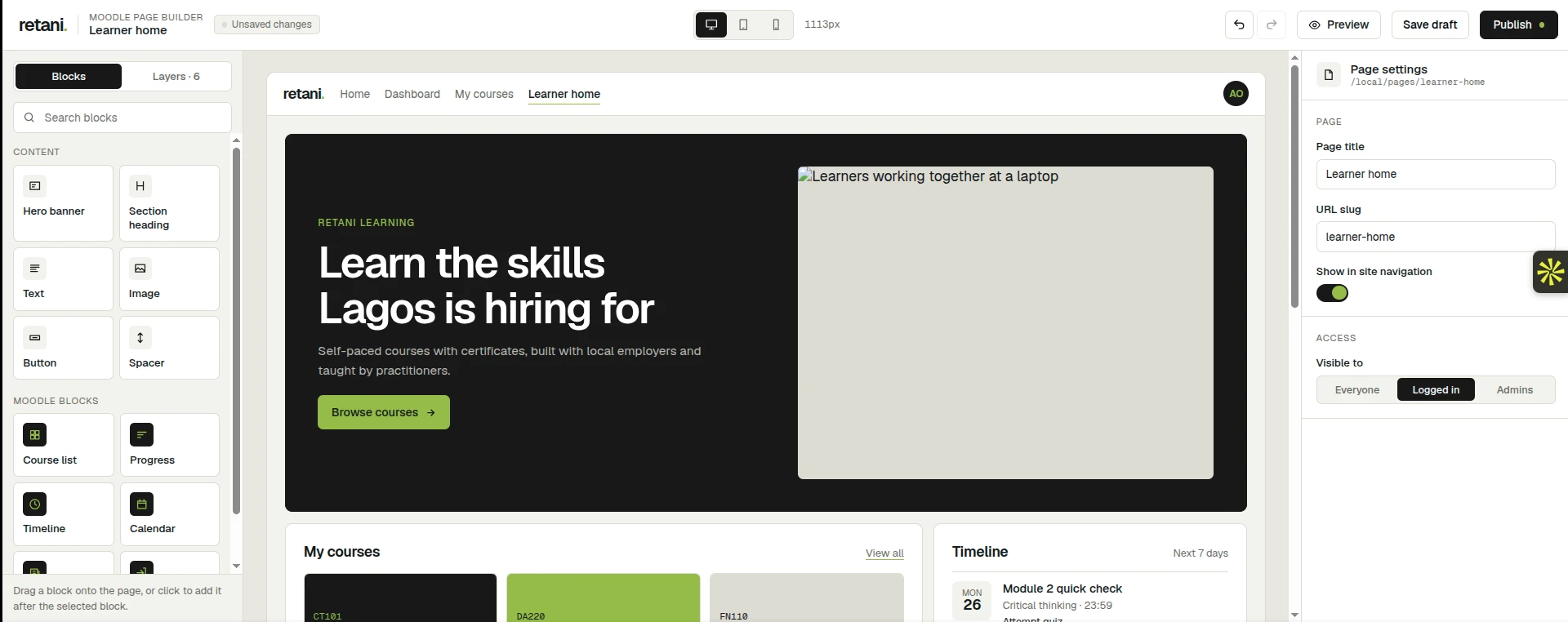
How a drag and drop page builder lets Moodle teachers and administrators design clear, mobile-friendly pages without writing code, and why that matters.
Moodle is powerful, but for many schools and training teams, changing what a page looks like still means calling a developer. A drag and drop page builder changes that. It puts page design in the hands of the people who know the learners best: teachers and administrators.
The problem: good learning sites need good pages
A learner's first impression of a Moodle site is rarely a course. It is a front page, a learner home, or a landing page for a programme. These pages should say who the site is for, what to do next, and where to find their courses, deadlines and progress.
Today, building or changing these pages usually takes technical skill. A simple request such as "add a banner for the new term" or "show the timeline above the course list" can wait days for a developer. Staff who do try to edit pages themselves often face confusing settings, or they paste in messy content that looks different on every screen.
The result is a familiar pattern: pages go stale, announcements are buried, and the site never quite reflects the institution it serves.
The idea: build pages from blocks
A drag and drop builder works like arranging furniture in a room. Every page is made of ready-made pieces, and you place them where you want them.
In the Retani Studio Page Builder, the pieces come in two kinds:
- Content blocks: a hero banner, section heading, text, image, button and spacer. These are the basics for telling a story on the page.
- Moodle blocks: course list, progress, timeline and calendar. These show live information from Moodle itself, so a learner sees their own courses and deadlines, not a static screenshot.
You drag a block onto the page, or click it to add it after the block you have selected. You then fill in a few simple fields, such as a heading, a short message, an image and a button link. There is no code to write and nothing to break.
How it works, in plain terms
Behind the scenes, the design follows a few straightforward ideas that keep the experience simple and safe.
- Pages are made from layouts. A layout is a page shape, such as one column, two columns, or a hero banner with three cards below. Each layout has named areas where blocks can go.
- It builds on what Moodle already does well. Moodle already knows how to place blocks, control who can see them and display them. The page builder reuses that, so pages behave the way Moodle administrators already expect.
- Editors choose from options, not code. Instead of writing HTML, you pick from presets such as light, dark or brand style. This keeps every page consistent and prevents accidental breakage.
- Switching layouts is safe. If you change a page from two columns to one, nothing is lost. Content from an area that no longer exists moves to the first area.
Why this matters for teachers
Teachers can present their own course community. A teacher or programme lead can build a welcoming page for a cohort: a banner, a short introduction, a button to the first module, and the timeline so learners see what is due this week.
Less waiting, more teaching. Changes that once needed a ticket and a developer can be made in minutes, between classes, using familiar visual tools.
Pages that respond to learners. Because Moodle blocks show live data, a learner home can display each learner's progress and upcoming deadlines automatically. Teachers do not need to update anything by hand.
Confidence to experiment. Drafts can be saved without publishing, and the preview shows how the page looks on desktop, tablet and mobile. Many learners use Moodle on their phones, so checking small screens matters.
Why this matters for page administrators
Control without bottlenecks. Administrators decide who can see each page: everyone, logged-in users only, or admins only. They can also decide who is allowed to edit pages. Staff can build, while the institution keeps control.
Consistency and brand. Because editors work with approved blocks and style presets, pages stay on brand even when many people contribute. There is no random font or oversized image.
Safer by design. Editors cannot inject raw code, which closes off a common source of broken pages and security problems. Accessibility is built into the layouts, including clear page regions and sensible heading order, so pages work better for screen reader users.
Lower cost and less dependency. Developers can focus on new features while everyday page updates are handled by the team that owns the content. Over time, this saves money and shortens the gap between an idea and a published page.
A clear publishing workflow. Pages start as drafts. Administrators can set the title and URL, check the preview, then publish when the page is ready.
What it deliberately does not do
Good tools say no to some things. The first version leaves out nested containers, free-form HTML, replacing course formats, and per-user layouts. This is a choice: fewer options mean fewer mistakes, and the builder stays easy to learn. Predefined layouts cover the common needs, and more can be added over time.
Looking ahead
The Retani Studio Page Builder is an upcoming module and is still an early preview, so details may change before release. The direction is clear, though: anyone responsible for a Moodle site should be able to design a clear, welcoming, mobile-friendly page without learning to code.
When teachers and administrators can shape their own pages, the learning site stops feeling like software that was installed and starts feeling like a place that belongs to the school.
How a drag and drop page builder lets Moodle teachers and administrators design clear, mobile-friendly pages without writing code, and why that matters.
Need something similar built?
Scoped, shipped, and handed off cleanly.